
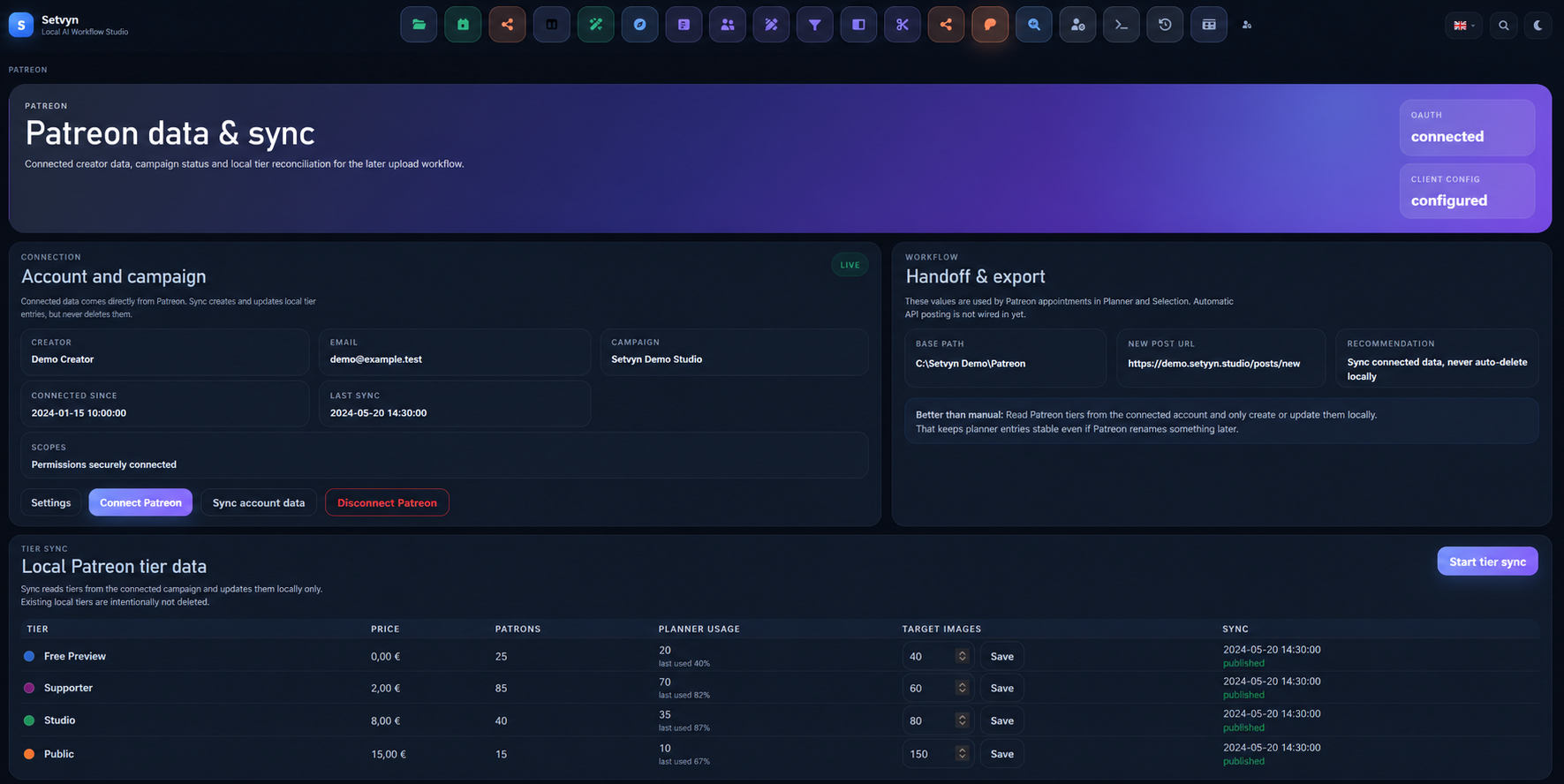
Sync current campaign tiers into local records without disconnecting existing planner history.
Patreon workflow
Connect tiers, image sets and scheduled releases in one workflow.
Keep Patreon campaign and tier context beside the local assets, target counts, and planner entries used to prepare each release.
OAuth account connection Local tier records Selected-image handoff User-controlled browser workflow
Tiers syncedLast sync · today
OAuth connect
Tier sync
Release planning
Image handoff
Reconcile locally
From tier to handoff
Keep the commercial context attached to the content being prepared.
Patreon releases involve more than a caption and an upload. Setvyn connects the campaign, local tier records, planned date, selected image set, access level, and handoff status so the release can be reviewed as one production item.
Assign a tier, date, content rating, image target, title, and selected asset set.
Prepare the image package and post details before continuing in a supported browser.
01 · Connect
Bring creator and campaign context into Setvyn through OAuth.
Connect a Patreon creator account using the configured OAuth flow. Setvyn retrieves the identity and campaign information needed for the local workflow and shows the connection and last-sync status in one place.
- OAuth connection and disconnection controls
- Creator and campaign identity status
- Connection and last-sync information
- Encrypted local storage for OAuth secrets
Labels shown are fictional demo values. Client IDs, secrets, tokens, scopes, emails, and real campaign identifiers are never displayed.
02 · Sync
Use current Patreon tiers without losing local planning context.
Tier sync creates or updates local tier records from the connected campaign. Existing local records are intentionally not deleted by synchronization, helping planner entries remain stable when external tier details change.
- Tier name, price, patron count, publication status, and Patreon link where available
- Created and updated local tier records
- Local SFW or NSFW classification
- Target image count per tier
- Planner usage and last-sync context
Synced Patreon data reflects the information returned by the connected API at the time of synchronization. It is not guaranteed to be continuously live.
03 · Plan
Connect the tier, schedule, and selected image set.
Create a Patreon planner entry, assign its audience or paid context, and connect the images selected for that release. Target counts make missing or extra assets visible before the handoff begins.
- Tier-aware planner entries
- Public or paid release context
- Scheduled date and time
- Selected local image set and expected image count
- Content-rating context for the workflow
Setvyn does not determine Patreon pricing, charge patrons, create memberships, or guarantee that a scheduled entry is automatically published at the selected time.
04 · Hand off
Review the package before continuing in the browser.
For supported image posts, Setvyn prepares the selected files, a consistent image package, and the release details needed by the browser workflow. The user can review the title, tier, image count, schedule, and security status before continuing.
- Image-only Patreon handoff in the current workflow
- Prepared title, tier, tags, date, time, and image-count context
- Temporary ZIP package with consistent image filenames
- Optional Windows Defender checks when enabled locally
- Supported browser session check and handoff
The implemented handoff described here is for image posts—not video, audio, polls, messages, or livestreams. The browser step is a controlled handoff; the creator reviews the post and completes publication.
After the handoff
Keep the local release record connected to what happened next.
Setvyn can retain upload and remote-post references with the planner entry, helping the local production record reflect the release workflow. Status and matching depend on the available Patreon and browser information and should remain reviewable.
Assets and post context are ready for review.
The supported browser workflow has been started.
Available remote post information is associated with the planner entry.
These states track the local workflow. They are not proof that Patreon accepted, scheduled, charged for, or permanently published a post unless the application confirms that exact state.
Local-first, connected when needed
Keep production assets local while using Patreon for account data and publication.
Setvyn keeps planner entries, tier settings, asset references, and workflow status in the local project. Connecting Patreon sends the OAuth and API requests required to retrieve the selected creator and campaign information. The final browser workflow communicates with Patreon as the user completes the release.
Stored in Setvyn
Planner entries, local tier settings, target counts, asset references, handoff preparation, and workflow status.
Exchanged with Patreon
Authorized identity, campaign and tier data, plus the browser interactions required for the creator's release workflow.
Connecting Patreon means the workflow is not entirely offline, and Setvyn makes no absolute legal, privacy, or security guarantees.
Move from selected assets to a planned Patreon release.
Schedule the release and keep its tier, title, content rating, and expected asset count together.
Choose the image set that will be attached to the planner entry and prepared for handoff.
Prepare related promotional content in a separate platform-aware workflow.
Review browser tasks and operational status across the wider Setvyn production system.
Choose the Patreon workflow depth that fits your production.
Patreon connection, planning, sync, and browser capabilities vary by Setvyn edition. Compare the current package details before choosing a workflow.
FAQ
Patreon workflow FAQ
Plan the release as one workflow
Keep tiers, assets, timing, and handoff context connected.
Move from a selected image set to a reviewed Patreon release without rebuilding the production context at every step.